My only work with the AI is the spec. After that, the system makes tickets, builds, tests, fixes, reviews and merges. I come back at the end to try staging and release to production.
I am the only developer on a production marketplace app I build. Claude Code writes most of the code. The repo has 1,322 commits, and one person makes the decisions.
I did not invent this setup. I built it from Anthropic's Claude Code docs and three talks from the AI Engineer conference. One is by Lydia Hallie of Anthropic. The links are at the end. This article shows the full flow and the checks that make it safe. Copy the parts that fit your team.
The flow, from spec to production
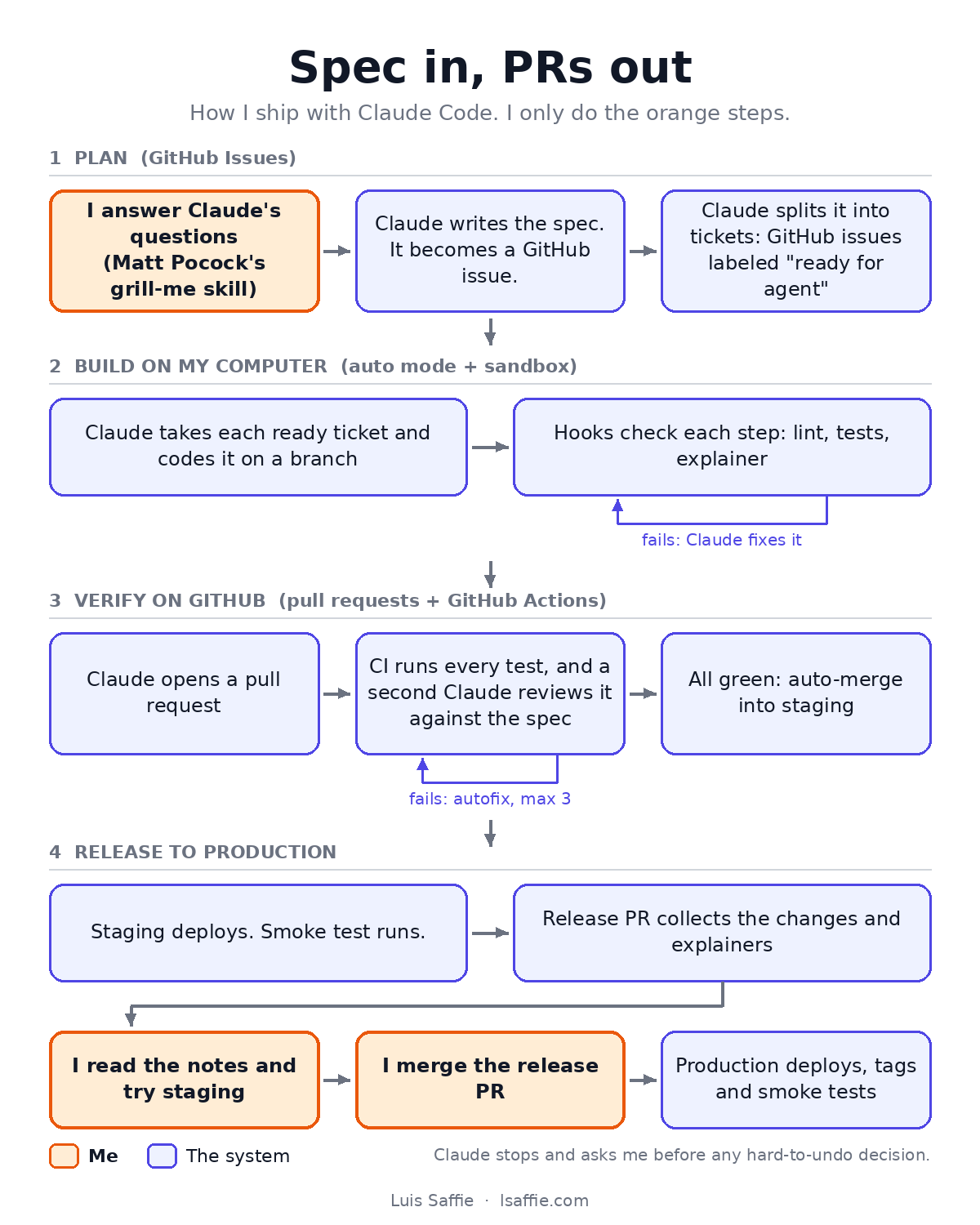
The flow has four parts.
1. Plan. This is my main work. Claude grills me with questions until all the context is there. I use Matt Pocock's grill-me skill for this. Then Claude writes the spec and splits it into tickets. The spec and each ticket become GitHub issues. The spec issue lists its tickets as sub-issues. A "ready for agent" label tells an agent that a ticket is ready to work on.
2. Build on my computer. An agent takes a ready ticket and codes it on a feature branch. A bug fix starts with a failing test that shows the bug. Hooks check each step. A failed check sends Claude back to fix it. Claude runs in auto mode, inside a sandbox.
3. Verify on GitHub. Claude pushes the branch and opens a pull request (PR) into staging. CI runs every check again. A second Claude reviews the diff against the spec. If a check fails, an autofix job lets Claude push a fix, at most 3 times. When everything is green, CI merges the PR into staging.
4. Release to production. Staging deploys, and a smoke test runs. A release PR collects all the changes and their notes. I read the notes and try staging. Then I merge the release PR. Production deploys, gets a release tag, and gets a read-only smoke test. If there is a problem, I roll back on the host, then fix on staging.
Claude also stops and asks me before any decision that is hard to undo. The rules section below shows how.
Parts 2 and 3 run without me. I own the start and the end. Everything runs on GitHub Issues, pull requests and GitHub Actions, so each step leaves a record.
Why the checks matter more than the agents
With AI agents, writing code is no longer the slow part. The risks moved.
The first risk is quality. An agent can produce a lot of code fast. Somebody must check all of it.
The second risk is control. An agent with a shell can push to main, delete a branch or deploy.
The third risk is the one I worry about most. I can stop understanding my own system. Then I cannot decide well what to build next.
Rules for the agent, in one short file
Claude Code reads a CLAUDE.md file at the start of each session. Mine has two levels. A global file holds how I work. A project file holds the rules of one repo, in about 70 lines.
These are the rules that changed my results the most:
- State the target state first. Before Claude writes code, it shows the end result in concrete terms. Counts, statuses, files or screens. At the end, it checks the result against that block.
- Sort decisions by how hard they are to undo. A data model, a published interface, a pricing rule and a promise to a client are one-way doors. Claude must stop and say "this is a one-way door". Then I decide.
- Challenge me once. Claude states the strongest case against my request, one time. Then it builds what I decide.
- Make the smallest change that solves the whole task. No extra features, files or abstractions. Each choice I did not make gets one line in the report.
- Show real output. At the end of a task, Claude reports the commands it ran and their real output.
- Schema changes use expand, then contract. One release adds the new shape and works with both. A later release removes the old one. So code can always roll back.
I also make Claude write in Simplified Technical English (ASD-STE100). Short sentences, active voice, common words. I read faster, and I miss less.
Checks on my machine: hooks
Hooks are scripts that Claude Code runs at fixed points. An exit code of 2 blocks the step and sends the message back to Claude.
| Hook | When it runs | What it does |
|---|---|---|
| Post-edit | after each file edit | formats the file, fixes lint, fails on new lint errors |
| Task completed | when Claude closes a task | runs the tests related to the changed files |
| Stop | before Claude ends its turn | lint, type check, unit tests, coverage, explainer check |
| Guard | before each shell command | blocks actions that only I may take |
The stop hook has a loop guard. After 3 blocks in a row, it lets Claude stop and report what still fails. Without it, an agent can loop for a long time.
Guardrails: try to break each one
Claude Code has deny rules. They block commands by their text. I tested them in a scratch repo, and one gap showed at once. This command got past the rule against pushes to main:
git -C <dir> push origin HEAD:mainSo I wrote a guard hook. It splits each command into parts and reads each part. It blocks force pushes, pushes to staging or main, and remote branch deletes. It also blocks reset --hard, clean -f, PR merges and deploys by hand. It ignores quoted text and heredoc bodies, because those are data. It checks commands inside bash -c and eval, because those are code.
The guard has 50 test cases, and CI runs them on every PR.
The sandbox adds a second layer. Sandboxed shell commands cannot read credential folders. Network access goes only to npm, GitHub, Playwright downloads and the Stripe API. A call to any other host fails.
One lesson from the audit: some settings work only in user settings, not in the repo. My strict network allowlist sat in the repo file and did nothing. I found it only because I tried to break it.
Start from the code you have: ratchets
My repo had 343 TypeScript errors and 784 lint errors when I started. A "zero errors" gate would fail every PR.
So each check is a ratchet. A ratchet is a stored number that can only get better.
- A baseline file holds the error count for each file. A file may not gain errors.
- When errors go away, the hook lowers the baseline.
- Test coverage has its own baseline. It may not drop.
CI: a second reader, a fixer and a careful merge
CI runs on every PR. It runs lint, type checks, 808 unit tests with coverage, the build, and 17 end-to-end tests in Playwright. The end-to-end tests cover 7 critical flows that I ranked by importance. They use fixed answers for AI and email calls, so they cost nothing and give the same result each time.
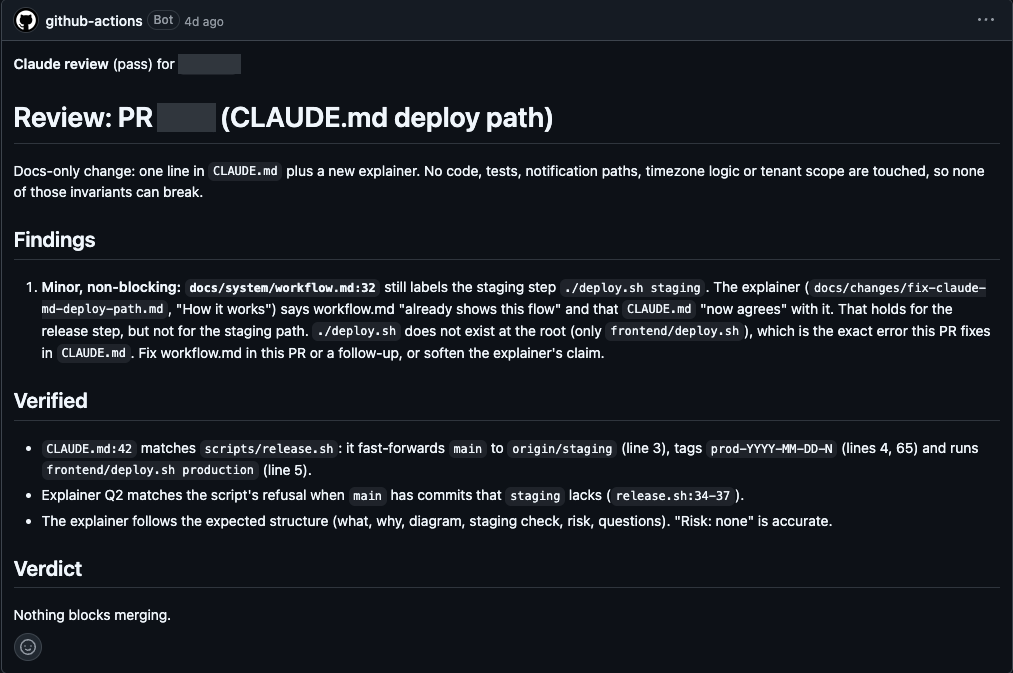
A second Claude reviews each PR. It reads the diff and the linked spec. It reports only four kinds of gaps: correctness, security, missing tests and spec gaps. No style notes. One review of a small PR took 8 turns and 39 seconds, at an estimated cost of US$0.10.
If a check fails, the autofix job gives Claude the failed logs. Claude must fix the cause. It may not weaken, skip or delete a test, or loosen a baseline. After 3 attempts, it stops and leaves a comment for me.
The merge job is strict. It merges only when every job is green and no blocking label is set. A review comment must also name the exact commit it reviewed. That last rule exists for a reason. The GitHub Action skips itself in some cases and still reports success. Without the commit check, an unreviewed PR could merge.
Keep the understanding: explainers
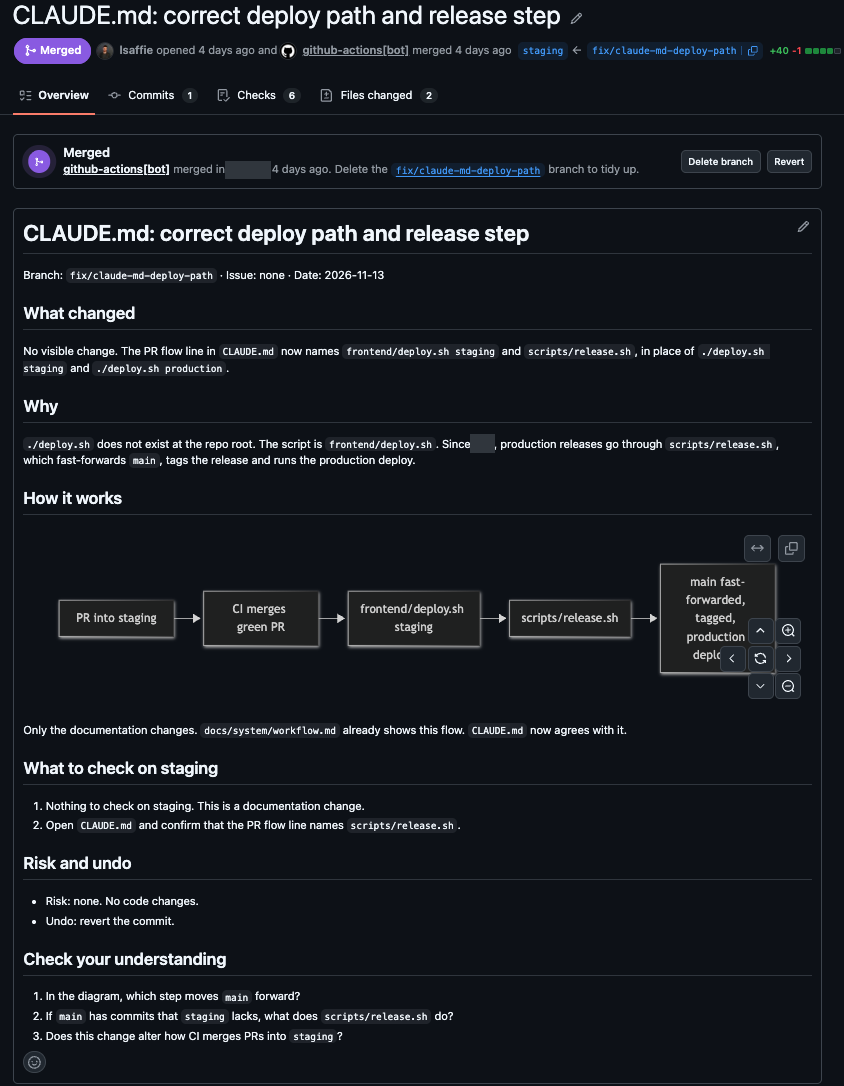
Every PR adds an explainer file. It has a short "what and why", a Mermaid diagram and the files changed. It also has steps to check it on staging, the risks, and three questions with answers.
A script checks each explainer in the stop hook and in CI. With no diagram or fewer than 3 questions, the check fails.
The release PR collects all the explainers since the last release. So before I merge to production, I read what changed and test myself on it. This is how one person stays the expert on a codebase that AI mostly writes.
Prove it: an audit with evidence
I wrote the setup down as 25 controls. The 5 groups are the agent on my machine, tests, GitHub, understanding and release. Each control says what PASS means and how to check it.
The rule for evidence is simple. A file path and line, or a command and its real output. "Looks configured" is not evidence.
| PASS | PARTIAL | FAIL | |
|---|---|---|---|
| First audit | 12 | 8 | 5 |
| After fixes | 24 | 0 | 1 (accepted) |
The one FAIL is branch protection on GitHub, which needs a paid plan for a private repo. I chose to accept it and wrote down what makes up for part of it.
I also tested the tests. I broke three important pieces of code on purpose, one operator or constant each. The related tests failed every time. After the restore, they all passed.
Lessons that cost me time
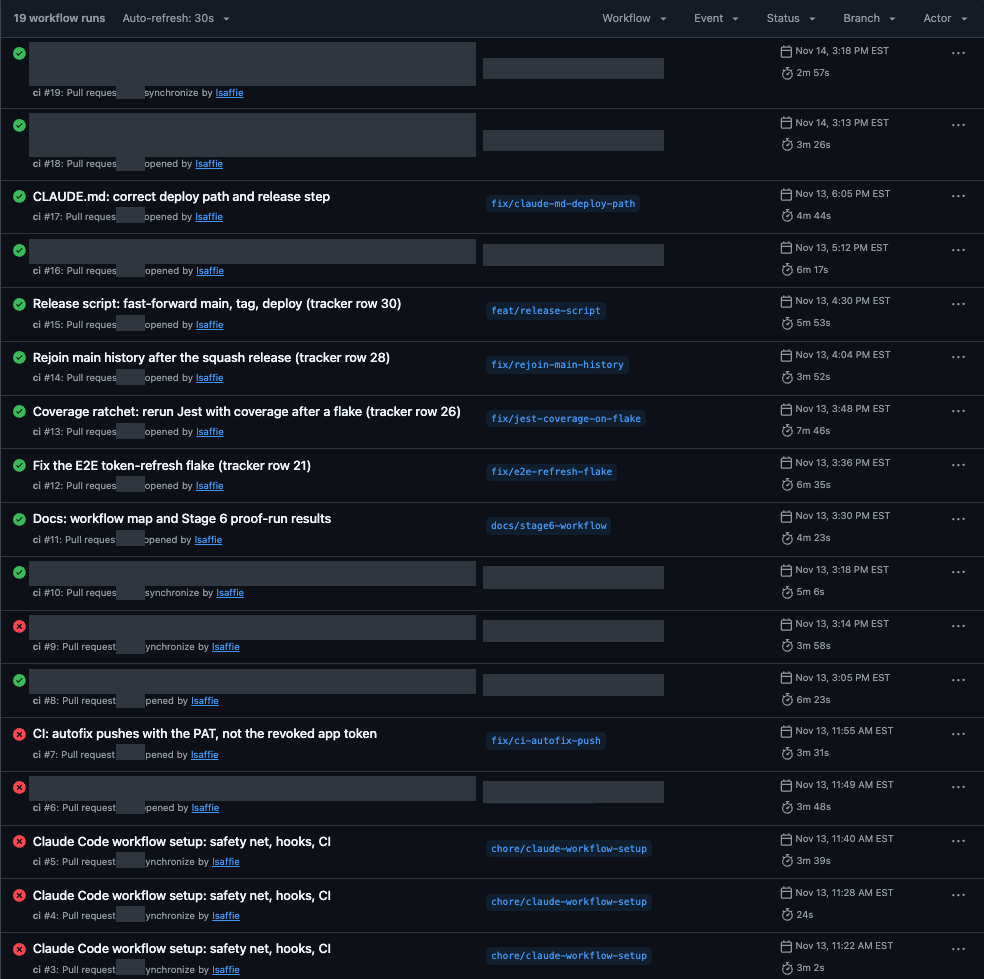
The setup did not work the first time. The screenshot shows the first CI runs. Each fix went in through the same flow, as its own PR.
- The GitHub Action for Claude skipped itself when the PR changed the CI file, and still reported success. Check for proof of a review, not a green tick.
- A push made with GitHub's built-in token starts no new workflow. My release automation needed a separate, narrow token.
- Workflows that start on workflow_run run only from the default branch. Changes to them do nothing until they reach main.
- When both an API key and an OAuth token were set, the action used the key. Every run failed in under a second, with no clear error. I removed the key, and the runs passed.
What this means for your team
None of this is specific to my product. Each repo has one adapter file for its branches, commands, deploy method and smoke checks. Everything else is the same in every repo.
This connects to my earlier work. At AutoTrader, I helped take engineering from no AI use to AI-native development. I was part of the rollout of Codex and skills to all teams. The tools change. The need for guardrails, proof and shared understanding does not.
Interested in this setup for your team?
I can help you set it up. Tell me what your team uses today. I will tell you where I would start.
Or email me at [email protected]
Sources
I built this setup from Anthropic's public Claude Code docs, three AI Engineer talks and one open skill.
Claude Code docs:
- Hooks: https://code.claude.com/docs/en/hooks
- Settings: https://code.claude.com/docs/en/settings-reference
- Skills: https://code.claude.com/docs/en/skills
- Claude Code in GitHub Actions: https://code.claude.com/docs/en/github-actions
- claude-code-action usage: https://github.com/anthropics/claude-code-action/blob/main/docs/usage.md
- Plugins: https://code.claude.com/docs/en/plugins-reference
Talks (AI Engineer):
- "Rethinking Claude Code Best Practices", Lydia Hallie, Anthropic: https://www.youtube.com/watch?v=vlfCjWuv4es
- "All Code Is Slop (Except Mine)", Lauren Tan: https://www.youtube.com/watch?v=O_zcc6Xl12g
- "How to Build a Software Factory That Improves Itself", Zach Lloyd, Warp: https://www.youtube.com/watch?v=nKjPBAw_N_0
Skill:
- grill-me, by Matt Pocock: https://github.com/mattpocock/skills/tree/main/skills/productivity/grill-me